
Why Most Online Soundwave Generators Fail Crafters & Tattoo Artists
Search for a free soundwave tattoo or Cricut SVG generator and you usually run into one of three frustrations:
- Surprise checkout paywalls: Sites like WaveVisual let you style your waveform for free, then hold the downloadable SVG behind a $9 per design checkout wall.
- Low-resolution raster screenshots: Free mobile apps export blurry PNGs that pixelate the moment a tattoo artist enlarges them onto thermal transfer paper or a laser engraver tries to trace clean vectors.
- Broken Cricut Design Space SVG uploads: Even when a site gives you an
.svg, it embeds<linearGradient>fills and live<text>labels — triggering Cricut Design Space's unsupported-item errors immediately on upload.
Our browser-based Sound Wave Generator computes exact 240-bin amplitude peaks strictly from your trimmed audio segment, renders 96 mathematical vector bars in 0.02s locally (zero upload of private voice memos!), and guarantees byte-for-byte parity between the live preview and downloaded .svg file for $0.
Official Cricut Design Space SVG Rules (Verified Nov 2026)
Every requirement below was checked directly against Cricut Help Center SVG upload guidelines (verified November 2026) and matched against our src/exporter-svg.js output:
| Cricut Design Space Rule | Why Uploads Fail on Standard Generators | Exact Setting in Our Sound Wave Generator |
|---|---|---|
| No Gradient / Pattern Fills | Cricut separates cut layers by flat solid colors; <linearGradient> triggers unsupported-item warnings or forces raster Print Then Cut |
Set BOTH Primary Accent and Secondary Accent to #000000 — our exporter omits <defs> and <linearGradient> completely and writes flat fill="#000000" |
No Live Editable <text> Elements |
Design Space cannot access external font files, causing shifted lettering or import warnings | Clear the Track Title field so the exported SVG contains zero <text> elements (add names or dates inside Design Space using native fonts) |
| No Hidden Background Box | Solid background rectangles import as an unwanted full-canvas cut rectangle | Set Background Canvas to Transparent Alpha (omits the outer background <rect>) |
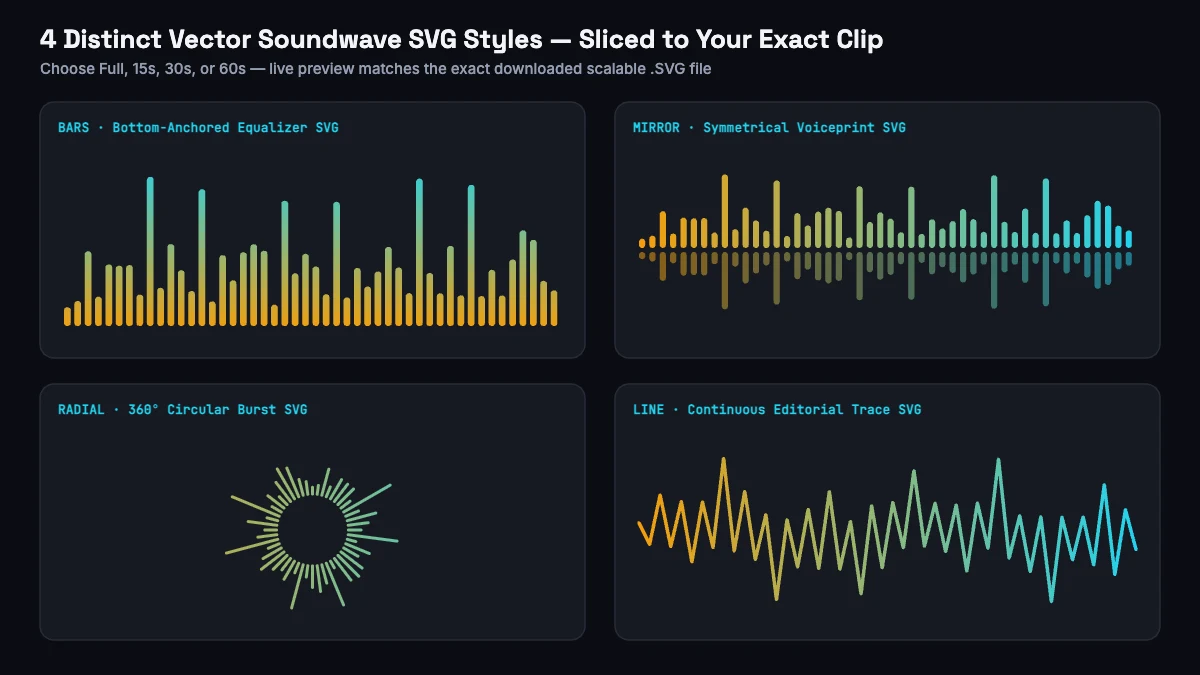
| Closed Filled Shapes for Blade Cuts | Blades cut around closed shape perimeters; open single-line strokes work for Draw pens, not vinyl cuts | Pick Bars or Mirror for ready-to-cut closed <rect> shapes (Basic Cut); reserve Radial / Line for Draw pens or stroke expansion |
Step-by-Step: Export a Clean Cricut SVG or Tattoo Stencil From Any Voice Memo
Step 1: Trim Your Audio to One Meaningful Phrase (1.5–6 Seconds)
Before generating a single bar, remember the golden rule of physical soundwave art: less audio makes a far more iconic visual shape. A 3-minute song looks like a dense brick of uniform noise, while a 2–4 second spoken phrase ("I love you", a baby's heartbeat, a voicemail laugh, or wedding vows) reveals unmistakable peaks, pauses, and syllabic rhythm.
- Convert or export your iPhone Voice Memo (
.m4a), Android recording, or song clip (.mp3/.wav) and drop it into Sound Wave Generator. Everything stays in local browser RAM — private family voicemails are never uploaded to any server. - If your phrase sits inside a longer recording, click 15s on the waveform deck, scrub to the start of the sentence, watch the Play ... · Export ... readout, and click Set Start Here (or trim a tight 3-second clip first in Voice Memos / Audacity so your exact words span the full 1600px width).
Step 2: Configure the 3-Setting Flat-Fill Recipe
Open the Style and Audio panels and dial in these three exact choices:
- Primary Accent =
#000000AND Secondary Accent =#000000: Whenever primary and secondary colors match, our exporter automatically switches from gradient mode to pure flat monochrome vector output — zero<defs>, zero<linearGradient>, every bar written with cleanfill="#000000". - Background Canvas = Transparent Alpha: Removes the outer canvas rectangle so only the pure soundwave shapes exist in your file.
- Track Title = Blank: Delete any auto-filled filename in the Track Title box so zero
<text>tags enter the SVG.
Step 3: Pick the Right Geometry for Your Medium
| Project Medium | Best SVG Style | Output Primitives (viewBox) |
Post-Download Prep Step |
|---|---|---|---|
| Cricut Vinyl Decal / HTV Shirt | Bars or Mirror | Closed filled <rect> bars (1600×520) |
Upload to Cricut Design Space → select all bars → click Weld or Attach so bars hold spacing on the cutting mat |
| Cricut Pen / Foil Sketch Card | Line or Radial | Open stroked <path> / <line> (1600×520 or 1200×1200) |
Change Layer Operation from Basic Cut to Pen (Draw) in Design Space |
| Tattoo Artist Thermal Stencil | Mirror (classic voiceprint) or Bars | Crisp scalable vector bars | Send the .svg (or 300+ DPI PDF from Inkscape/Figma) straight to your tattoo artist; do not send a compressed phone screenshot |
| LightBurn Laser Engraving (Wood / Slate / Tumbler) | Mirror or Bars (flat #000000) |
Closed filled <rect> shapes |
Import .svg directly into LightBurn → set layer mode to Fill (delete the subtle center hairline <line> if you want pure floating bars) |
| Framed Wall Poster / Wedding Print | Mirror or Radial | Infinite-resolution SVG | Open in Figma, Canva, Illustrator, or Inkscape at any poster size (8×10, 18×24, or 24×36 in) with zero blur |
Cricut Tip on the Center/Baseline Rule: Both Bars and Mirror include one subtle thin <line> baseline/centerline alongside the 96 rounded <rect> bars. In Cricut Design Space's Layers panel, either hide/delete that single hairline layer before clicking Attach (for clean floating vinyl bars that are effortless to weed) or convert that single line to Draw / Score.
Tattoo Artist Sizing & Longevity Rules (Preventing Ink Blur)
Skin changes over 5 to 15 years, and fine-line parallel bars are notorious for blurring together if sized too small. Share these physical measurements with your tattoo artist when preparing your stencil:
- Minimum physical width: Plan at least 3.5 to 5 inches (9–13 cm) wide across a forearm, collarbone, or ribcage if keeping all 96 bars — or ask your tattoo artist to simplify/widen every second bar in Illustrator for a wrist tattoo under 2.5 inches.
- Minimum gap between neighboring bars: Aim for at least
1.5 mm – 2.0 mmof open skin between adjacent vertical bars so natural ink spread never merges two peaks into a solid black smudge. - Mirror vs. Bars on skin: Symmetrical Mirror voiceprints sit balanced along straight anatomy (inner forearm, spine, bicep), while single-sided Bars align cleanly above a collar line, date, or handwritten lyric.
- Permanent SVG vs. "Playable" Soundwave Tattoo Apps: Be clear about expectations before getting inked. A raw vector SVG is a true visual amplitude record of your audio that belongs to you permanently with zero recurring fees. Commercial "scannable" soundwave tattoos do not store audio data inside the ink itself — they depend on a proprietary paid smartphone app matching a camera photo to a hosted audio file on that company's servers. If you want both visual authenticity and a backup way to hear the recording years later, save the original voice memo in cloud storage alongside your SVG (or embed a tiny QR link on a framed print instead of tattooing an app-dependent pattern).
Checking Your Exported SVG in 5 Seconds
Because our Sound Wave Generator renders the exact same SVG string to both the live preview canvas and your downloaded .svg file, what you see on screen is guaranteed to match the downloaded XML byte-for-byte. If you want to double-check before loading your cutting mat, open the downloaded .svg in any plain text editor and confirm:
- Zero
<linearGradientoccurrences (confirms flat-fill mode active); - Zero
<textoccurrences (confirms blank Track Title); - Starts cleanly with
<svg xmlns="http://www.w3.org/2000/svg" viewBox="0 0 1600 520"(or1200 1200for Radial).
Ready to turn the exact same voice memo or wedding song into a moving keepsake video or looping newsletter graphic? Switch to our Audio Waveform Visualizer & GIF Maker or MP3 to Video Converter — your audio carries over locally in browser memory with zero re-upload.
Sources & Primary References
All SVG upload constraints and geometry notes in this guide were verified against official Cricut documentation and W3C/MDN vector standards (checked November 2026):
- Cricut Help Center — Image uploads: unsupported items (official documentation explaining why pattern/gradient fills, live editable
<text>elements, and clipping paths trigger Design Space SVG upload warnings): https://help.cricut.com/hc/en-us/articles/360009553213-Image-uploads-unsupported-items - MDN Web Docs — SVG Element Reference (standard
<rect>,<path>,<line>,<defs>, and<linearGradient>markup behavior): https://developer.mozilla.org/en-US/docs/Web/SVG - Audio Visualizer Online Engineering Lab (source verification of
src/exporter-svg.js240-bin amplitude slicing, byte-identical preview/download parity, and flat-fill monochrome output): About & Verified Benchmarks