
Static Vector SVG Soundwave Art + Moving Video in One Free Tool
People searching for a sound wave generator from audio fall into two groups: makers who want a crisp, high-resolution static soundwave graphic (for a meaningful voice-note tattoo, wedding vows poster, podcast cover, laser cut, or Cricut craft), and creators who want a moving sound wave video.
Many soundwave art websites let you customize your graphic for free, then surprise you with a $9 single-download fee when you click Download SVG. Audio Visualizer Online calculates the exact peak amplitude envelope of your audio locally and gives you instant, infinite-resolution Vector SVG downloads for $0.
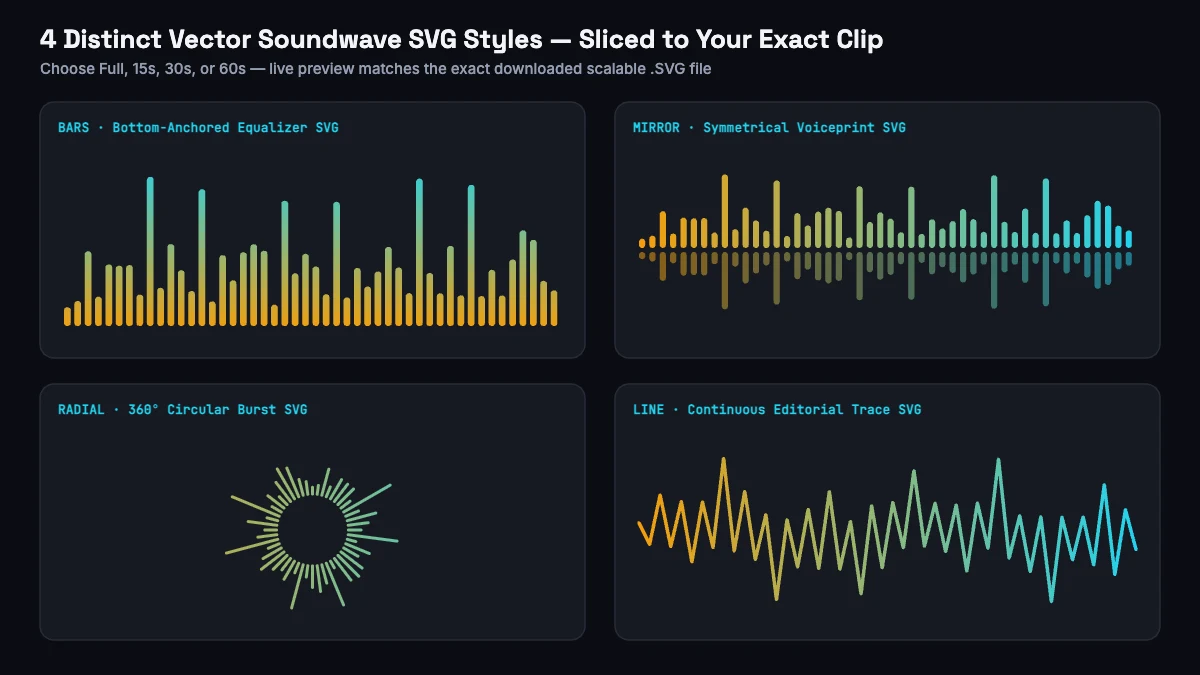
4 Clean Vector Soundwave Geometries
- Bars: Bottom-anchored rounded equalizer columns rising cleanly from a crisp horizontal baseline (closed filled
<rect>geometry suited for direct Cricut Basic Cut). - Mirror: Centered symmetrical voiceprint with full-opacity upper peaks and softer lower reflection around a horizontal axis — the classic look for framed prints, minimal tattoos, and Cricut cut vinyl.
- Radial: Circular 360-degree radial soundwave burst ideal for album inserts, vinyl stickers, and emblem logos.
- Line: Continuous minimal SVG path tracing your audio contour for sleek modern editorial design.
Pro Tips for Cricut Design Space, Tattoos & Laser Engraving
- Trim Right Inside the Studio: Use the Full / 15s / 30s / 60s pills, watch the Play ... · Export ... readout, and click Set Start Here to move the clip start to the current playhead (or click outside the highlighted region on the waveform to reposition the window) so a single spoken sentence ("I love you", wedding vows, or a chorus hook) fills the entire SVG width — the live preview updates immediately and downloads byte-matched to that exact 240-bin peak slice.
- Exact 3-Step Cricut Design Space Flat-Fill Setup: Cricut Design Space rejects SVG gradient fills and live editable text. To export a clean cut-ready file directly from this studio:
- Set both Primary Accent and Secondary Accent to
#000000— whenever both colors match, our exporter outputs flat solid fills (fill="#000000") with zero<linearGradient>definitions; - Set Background Canvas to Transparent Alpha (omits the outer background rectangle);
- Clear the Track Title field so the SVG contains pure vector bar geometry with zero editable
<text>elements.
- Set both Primary Accent and Secondary Accent to
- Closed Cut Bars vs. Pen Draw Paths: Pick Bars or Mirror for ready-to-cut closed
<rect>shapes in Cricut Design Space, or pick Radial / Line for single-line Draw pen operations (or expand strokes in Inkscape/Illustrator before cutting vinyl).
Need full sizing rules for tattoo stencils, LightBurn engraving, and Cricut mat prep? Read our Soundwave Tattoo & Cricut Cut SVG Guide.