
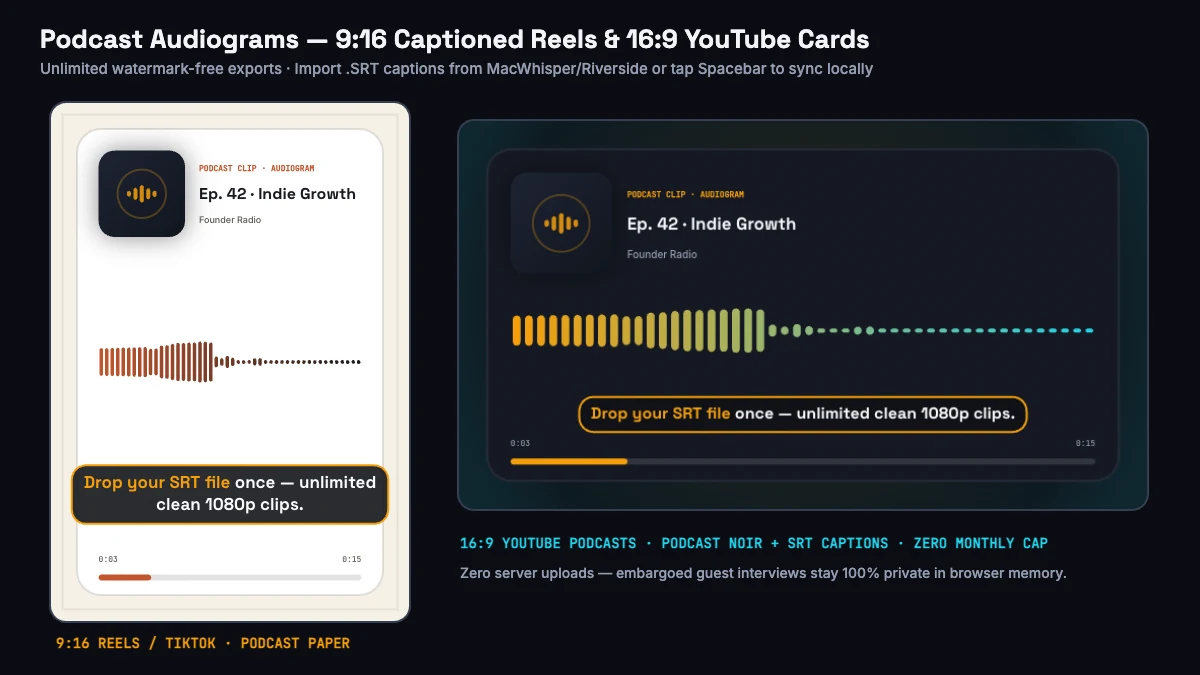
Unlimited Podcast Audiograms Without Monthly Watermark Caps
Social video clips are the single highest-leverage way to grow an audio-first podcast on Instagram Reels, TikTok, YouTube Shorts, and LinkedIn. Yet podcasters face a frustrating squeeze: legacy tools tightened free plans to 1 unwatermarked audiogram per month, while design-first web apps let you style for free only to demand $9 per download or $29/month at checkout.
Audio Visualizer Online's Podcast Audiogram Maker runs 100% locally in your browser using offline WebCodecs encoding — meaning zero cloud render bills for us, and unlimited 1080p no-watermark audiograms for your show.
4 Editorial Templates Crafted Specifically for Spoken Audio
- Podcast Paper (Default Above): High-contrast warm archival paper card (
#f6f1e7) with terracotta voice waveform, show badge, episode cover, timecode scrub bar, and dark high-legibility caption pill — engineered to stop scrolling on LinkedIn and Reels. - Podcast Noir: Sleek dark broadcast studio aesthetic with amber progress meter and crisp white/gold active-word captions.
- Player Pill: Compact floating podcast player widget ideal for clean quote-over-background aesthetics.
- Quote Clip: Oversized editorial pull-quote framing built for punchy 15–45 second host insights on vertical feeds.
Fast 4-Step Podcast Clipping Workflow
- Drop Your Episode Audio & Show Artwork: Load any MP3, WAV, or M4A recording. Everything stays on your machine — ideal for embargoed guest interviews.
- Select Your 30s or 60s Highlight: Click the 30s or 60s pill on the waveform deck, check the Play ... · Export ... readout, and scrub inside the waveform to audition your quote — then click Set Start Here to move the export clip start to the current playhead (or click outside the highlighted region on the waveform to jump the clip window directly).
- Drop Your .SRT Captions (or Tap-Sync): Import an
.srtfile from Descript, MacWhisper, or Riverside in one click, or paste a short quote and stamp each sentence with the Spacebar. - Bounce 1080p MP4 in Seconds: A 60-second 1080p audiogram renders offline in ~8–12 seconds ready for immediate upload.
Looking for a full comparison with Headliner, WaveVisual, and Veed? Read our Best Free Headliner Alternatives Guide, build valid captions with How to Create an SRT File Free, convert an iPhone recording via How to Turn a Voice Memo Into a Video, or check exact vertical margins in our TikTok, Reels & YouTube Shorts Safe Zone Guide.