
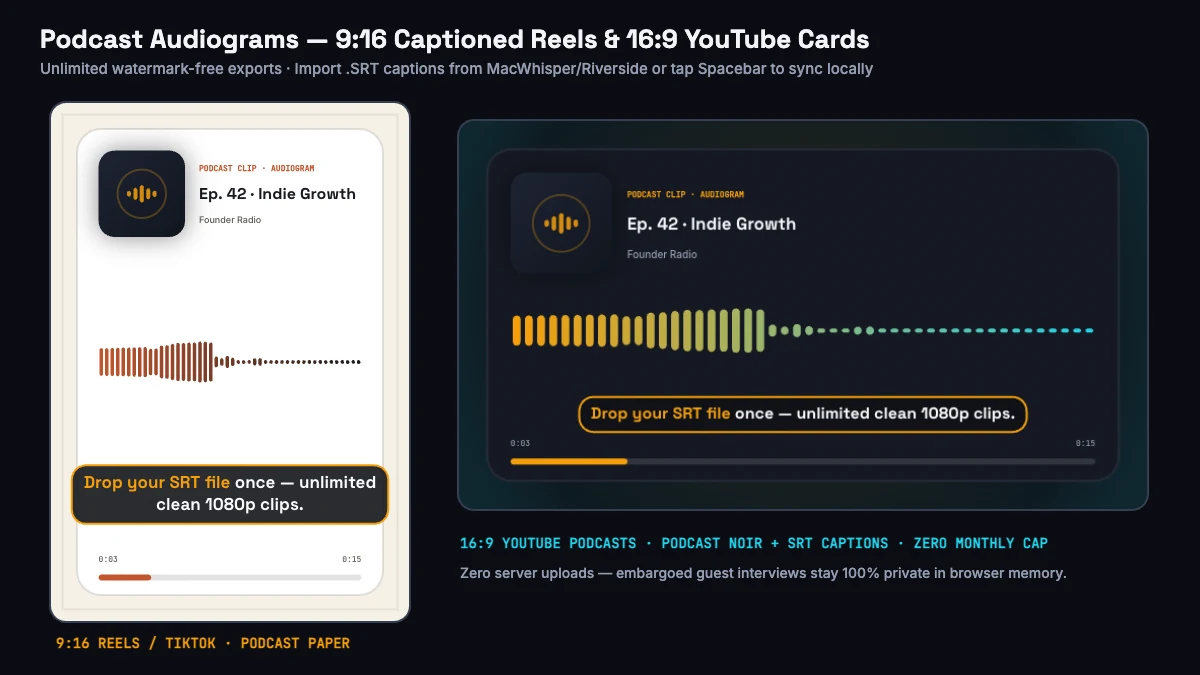
Turn Audio-Only Podcasts Into Ready-to-Upload 16:9 YouTube Episodes
This studio runs 100% locally and delivers the ready-to-upload 16:9 1080p (or 720p) H.264 MP4 episode file straight to your computer — no cloud queue, no watermark, and no third-party YouTube account connection. You keep complete control over your episode artwork, reactive voice waveform, elapsed/remaining episode clock, and optional burned-in .SRT captions.
Publish to YouTube Podcasts in 3 Steps
Per YouTube Studio's official Podcasts documentation, a podcast show on YouTube is a designated playlist and each episode is a full video assigned to it. Once your 16:9 MP4 finishes exporting above:
- Open YouTube Studio → Content → Podcasts → New podcast (or click Create → New podcast, or choose an existing podcast playlist and add a square show thumbnail).
- Upload your exported 16:9 MP4 episode: Inside that podcast playlist, click Add videos → Upload videos and select the 16:9 1080p (or 720p) MP4 file bounced from this studio.
- Assign the full episode video to that Podcast playlist: Save your episode details and publish so YouTube distributes the episode across both YouTube and YouTube Music Podcasts — with custom reactive visuals, chapters, and episode thumbnails instead of a static RSS image.
Clean Podcast Framing Built for Spoken Episodes & Social Clips
Music visualizers built for EDM tracks often crowd the screen with flashing rings and distracting effects. Our Podcast Noir and Podcast Paper presets focus on what podcast viewers actually scan on YouTube and vertical feeds:
- 16:9 Broadcast Card vs. 9:16 Vertical Clips: Podcast Noir pairs a clean widescreen 16:9 dark studio card, show artwork frame, and horizontal spectrum strip for full YouTube episodes, while Podcast Paper switches to a high-contrast warm editorial card framed for 9:16 vertical clips.
- Legible Episode Clock & Show Artwork Framing: Displays a clip-relative elapsed/remaining episode clock alongside cleanly framed show artwork and auto-wrapped episode titles that stay legible inside the card bounds.
- High-Contrast
.SRTCaption Boxes: Pairs with the Podcast Box caption style so imported.SRTtranscripts from Descript, Riverside, or Whisper stay crisp and readable above the waveform.
Recommended Settings for Long-Form YouTube Podcasts
| Episode Length | Recommended Resolution | Frame Rate | Typical Local Export Time (Desktop Chrome) |
|---|---|---|---|
| 1 – 5 min (Trailer / Solo) | 1080p HD (1920×1080) |
30 fps | ~12 – 55 seconds |
| 5 – 15 min (Short Show) | 1080p HD or 720p Fast |
30 fps | ~1 – 3 minutes |
| 15+ min (Full Interview) | 720p Fast (1280×720) |
30 fps | ~2 – 6 minutes (smaller upload file, identical 48 kHz AAC audio) |
Tip for mobile creators: Mobile browsers restrict tab memory on multi-hundred-megabyte video buffers. For full episodes longer than 5 minutes, always export on desktop Chrome or Edge for full hardware WebCodecs speed. Need the full encoding checklist comparing manual 16:9 MP4 uploads against YouTube RSS ingestion? Read our How to Upload MP3 & Audio Files to YouTube Guide and 44.1 vs 48 kHz Audio Specs for YouTube & Podcasts.