
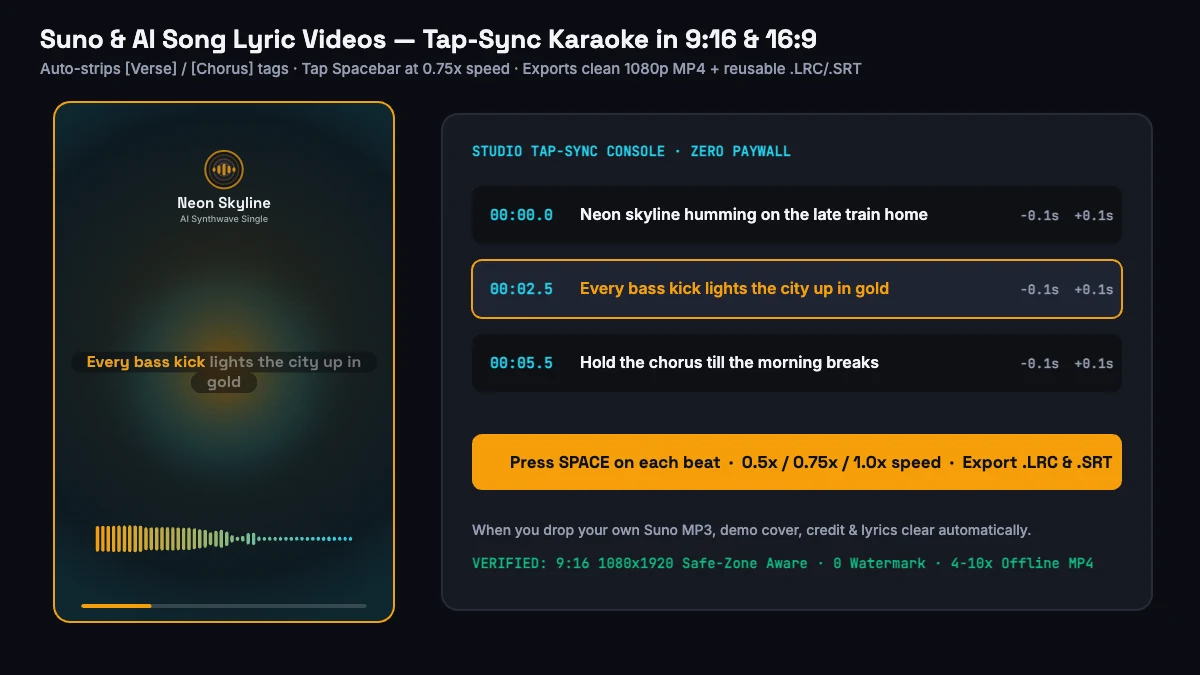
Why Manual Timeline Lyric Editing Takes 30 Minutes — And How Tap-Sync Cuts It to 3
Ask any indie musician, lyricist, or AI song creator what slows down release week the most, and the answer is almost always the same: syncing lyrics to video. Dragging 35 separate text layers along a mobile editor timeline, trimming every tail by hand, and re-nudging everything when a chorus enters half a beat early easily burns 20 to 40 minutes per song.
Meanwhile, automated "AI lyric video" web apps lock watermark-free 1080p exports behind $14.99 to $29.99/month plans — and still mishear sung vowels, ad-libs, reverb-heavy vocals, and slang.
A structured .LRC / .SRT + Studio Tap-Sync workflow solves both problems for $0: you keep 100% spelling accuracy from your real lyric sheet, align an entire 3-minute song in a single real-time pass, and walk away with both a rendered 1080p MP4 and a reusable .SRT / .LRC timing file.
.LRC vs .SRT: Choosing the Right Lyric Timing Format
Before you time a single word, pick the subtitle container that matches your audio structure. Both formats are plain UTF-8 text files recognized by YouTube Studio under Google's official Basic file formats specification (verified November 2026), yet they behave very differently during silence and instrumental breaks:
| Feature | .LRC (LyRiCs Format) |
.SRT (SubRip Subtitle Format) |
|---|---|---|
| Syntax Example | [00:12.40] Neon rain on the glass |
1 / 00:00:12,400 --> 00:00:15,100 / Neon rain on the glass |
| Timestamp Precision | Centiseconds (0.01s), start time only |
Milliseconds (0.001s), explicit start AND end time |
| Behavior During Instrumental Breaks | Previous line remains active unless you insert a blank timestamped line | Clears automatically the millisecond end time passes |
| Multi-Line / 2-Speaker Support | Single line per timestamp | Native multi-line blocks (ideal for duets & 2-speaker podcasts) |
| YouTube Studio Closed Captions | Supported (basic plain text, no styling) | Recommended standard (basic UTF-8; inline HTML tags stripped) |
| Best Use Case | Continuous music players, fast lyric sheets, karaoke tracks | Music videos with solos/intros, TikTok hooks, podcasts, NLE import |
Lab Verification Note (v5-fourth-audit-repro-report.json): Many web editors internally flatten imported .SRT files into .LRC, silently wiping out explicit end timestamps and stretching quick 0.2s cues up to 0.5s. We tested this exact failure case locally in Chrome with a 3-cue .SRT (2.0–3.0s, 32.0–34.0s, and a fast 36.0–36.2s hit). After nudging cue 3 by +0.1s and reloading the studio, all three cues held exact timing (2–3s, 32–34s, 36.1–36.3s) and frame inspection at t = 8.0s measured 0 caption pixels — confirming zero stuck lyrics during instrumental gaps.
Why Browser Lyric Videos Drift Out of Sync (The 44 ms AAC Priming Trap)
If you have ever timed lyrics dead-on inside a web preview only to notice the exported MP4 feels slightly sluggish on fast snare hits or rap double-time, you ran into AAC encoder priming delay.
Standard browser WebCodecs AAC encoding prepends roughly 2,112 silent priming samples (~44 ms at 48 kHz on desktop Chrome) before the first real audio sample. If the MP4 container does not declare that priming offset, players start the audio 44 ms late relative to frame 0 — shifting every lyric reveal slightly early or late compared to the vocal transient.
Our local MP4 muxer dynamically measures the browser's exact AAC priming delay and writes ISO 14496-12 edts/elst edit-list atoms alongside sgpd/sbgp (roll = -1) metadata. Across both FFmpeg and Apple AVFoundation (v4-third-audit-repro-report.json), test click onsets at 250 ms, 1,000 ms, and 2,500 ms decoded at exact [250, 1000, 2500] ms (0.0 ms drift) across exact 3.000000s and 8.000000s durations.
Step-by-Step: How to Add Synced Lyrics to Any Video in 4 Minutes
Step 1: Load Your Song, Cover Art & Raw Lyrics
Open Suno & Indie Lyric Visualizer (or the Main Studio for 16:9 widescreen) and drop your MP3, WAV, M4A, or FLAC audio alongside your cover artwork. Open the Lyrics tab and either:
- Import an existing
.SRTor.LRC(from Whisper, MacWhisper, Descript, Riverside, or a lyric archive), OR - Paste your plain-text lyric sheet. Bracket section headers like
[Intro],[Verse 1],[Pre-Chorus],[Chorus], and[Outro]are stripped automatically so structural notes never flash on screen.
Step 2: Run One Clean Tap-Sync Pass (With Continuous Slow-Motion Switching)
- Pick your playback speed:
1.0×for mid-tempo indie, rock, or ballads;0.75×for pop hooks; or0.5×for rapid rap verses. You can even flip speeds mid-playback without the playhead jumping backwards (verified monotonic inv4-third-audit-repro-report.json:2.613s @ 1× → 2.645s @ 0.5× → 2.869s). - Click Start Tap-Sync. Playback begins with Line 1 armed (it will not stamp
0.00sprematurely during an instrumental intro). - Tap Spacebar right as each vocal line begins. Each tap automatically closes the previous line cleanly with zero overlap.
- Need to pause halfway through a 3-minute song? Your partially stamped draft (synced + remaining unsynced lines) persists locally across tab reloads and tool-page switches so you can click Resume Tap-Sync right where you stopped.
Step 3: Micro-Nudge & Rebase Short Clips
- Listen back once. If any entrance landed a fraction early or late, click
-0.1or+0.1beside that exact line. Explicit.SRTend times and quick0.2scues stay locked. - Cutting a 30-second chorus teaser from a 3-minute track? Choose 30s on the waveform deck, audition your hook, click Set Start Here, and switch the subtitle export toggle to Active Clip (0:00). Your downloaded
.SRTor.LRCautomatically rebases all timestamps so your chorus starts cleanly at00:00for TikTok, CapCut, or Reels.
Step 4: Match Typography Style & Safe Zones to Your Platform
| Platform & Ratio | Recommended Lyric Style | Safe Zone Rule | Export Settings |
|---|---|---|---|
TikTok / Reels / Shorts (9:16) |
Karaoke (progressive gold sweep) or Kinetic (beat bounce) | Turn on Safe Zones — keep lines above bottom 20% caption bar & clear of right-side Like/Share buttons | 1080×1920, 30fps or 60fps MP4, 30s–60s hook |
YouTube Official Lyric Video (16:9) |
Editorial (clean fade) or Karaoke | Center lower-middle third so YouTube scrub bar never hides active lyrics | 1920×1080, 30fps MP4, Full track (~36s local render) |
Podcast Quotes & 2-Speaker Clips (9:16 / 1:1) |
Podcast Box (high-contrast pill with active word highlight) | Keep 2-speaker \n line breaks intact; studio adaptively wraps up to 6 lines without dropping words |
1080×1920 or 1080×1080, 30fps MP4 |
| Premiere / DaVinci / CapCut Overlay | Any style on Transparent Alpha or Green Screen | Export lyrics + bars over footage without re-timing in your NLE | 32-bit RGBA MOV (Premiere/AE/Resolve) or Green MP4 (CapCut/FCP) |
Burned-In Lyrics vs. Closed Captions: Best Practice for Reach
- Burn lyrics directly into pixels on TikTok, Instagram Reels, LinkedIn, and YouTube Shorts, where most viewers scroll muted for the first 3 seconds and visually distinctive typography drives saves and shares.
- Upload your exported
.SRTas closed captions in YouTube Studio (Subtitles → Add Language → Upload file → With timing) on full-length YouTube videos — even if you used a subtle Cover Card or Vinyl Spin visualizer — so search engines index your text and international fans can enable YouTube auto-translate.
Need to wrap a clean MP3 and cover art for YouTube without lyrics first? Jump to MP3 to Video With Image or read our How to Upload MP3 & Audio Files to YouTube Guide.
Sources & Primary References
All subtitle syntax requirements, container timing atoms, and sync benchmarks in this guide come directly from official platform specs and local stream analysis (checked November 2026):
- YouTube Help — Supported subtitle and closed caption files (official support for basic UTF-8
.srtand.lrcfiles, plain-text markup stripping): https://support.google.com/youtube/answer/2734698?hl=en - Apple Developer Documentation — QuickTime File Format (edit lists
edts/elstand sample-group roll-distance mechanics for AAC priming compensation): https://developer.apple.com/documentation/quicktime-file-format - MDN Web Docs — WebCodecs AudioEncoder.configure() (browser AAC
mp4a.40.2encoding configuration): https://developer.mozilla.org/en-US/docs/Web/API/AudioEncoder/configure - Audio Visualizer Online Engineering Lab (Chrome +
ffprobe& Apple AVFoundation verification of0.0 msonset drift at[250, 1000, 2500] msand.SRT0.2scue round-trip fidelity): About & Verified Benchmarks